Tuesday, March 5, 2013

Human Computer Interaction - Blog 5


Final Project!

                The end of the semester is around the corner and it’s about that time of the year when we get swamped with final projects and assignments. After discussing many areas of Human Computer Interaction and all of its related topics, I can say that I have learned a great deal. In last week’s lecture we looked at three different themes that we would have to choose for our final project, they were: Change, Glance and Time. This is quite interesting because in groups we will be all working on accomplishing very different goals.

Change

                Looking at the first theme of change, I often think about a person’s behaviour or attitude towards something. Change can mean many things, it can be physical, emotional and mechanical or almost anything that alters from its original form. For the purpose of the assignment the groups who will be working on this particular theme will have to focus more on an individual’s behaviour. Some of the examples that a few students were describing in class would include exercise or learning games, where a player changes either by improving an existing skill or learning a new skill. Some examples I can think of in today’s gaming world would include games like Brain Age or a more physical game such as Wii Fit. Working in video game retail and seeing children purchase the Nintendo DS and buy Brain Age, I’ve often had to explain how it helped them learn skills. A game like Brain Age starts at an extremely low level so that children are able to adapt to it well. Children of the lower elementary grade levels can also learn skills such as math and spelling. Wii Fit brought something quite remarkable to that generation of gaming because it was the first time we were able to play an exercise game on a console. Women in their mid-20s-30s found it extremely interesting and would often be the consumers of this game. They would talk about how they were able to set certain goals and the game would track their progress. For the sake of this final project, I believe groups that are using the Kinect Sensor would probably find this to be the most suitable hardware to work with. The amount of things that we can do with the Kinect’s technology can bring change in almost all physical and mechanical forms.

Glance
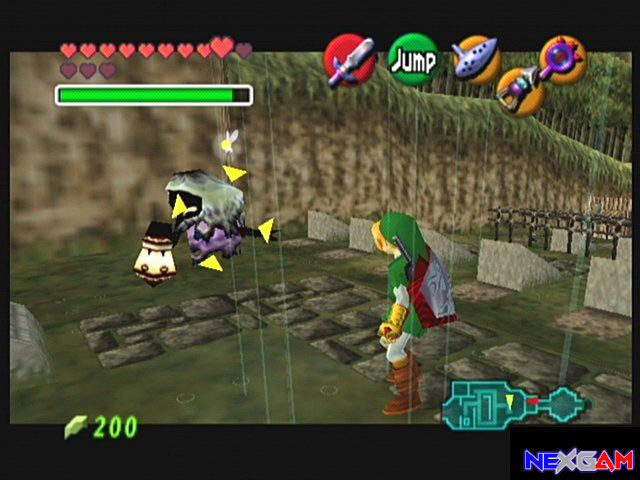
                The theme of glance, at first I had no idea what this even meant. After talking about glance in our lecture I gained the understanding that it had a lot to do with the player’s eye movement and the screen of viewpoint of the game. Things such as the User Interface and more specifically the HUD would be in my opinion the focus of this theme. Thinking of game like the Nintendo 64 title The Legend of Zelda – Ocarina of Time, the dashboard and HUD were quite complex. It was one of the games that in my opinion introduced complexity in a games user interface. Having the C-buttons mapped out on the top of the screen with a start menu opening the ability to see many different items was quite complicated. This theme would be quite difficult to complete in my opinion. The mission for the students involved in this project is to design a personal game user interface tailored to their needs using novel technologies as stated in the project outline. Once again I can only really think of people using the Kinect hardware to do this. I do this imagining some playing an FPS game with the characters hands and or gun on the screen moving to the movement of the player with the Kinect sensor. I wonder to myself how this can be done through a brain sensing hardware, what are some existing ideas? And how is it even possible to tie in the connections with both the player’s brain waves and physical virtual code. Seems a little too simple? But I say this with very little thought involved. After all, the theme that my group has is Time.

Time

                Time is a broad term that can be manipulated in many ways both complex and extremely simple. When I think of times in some of my favourite games, I think of the nerve wrecking puzzles of games like Prince of Persia on the Playstation 2, where I had to pull levers and climb to the top of buildings in a short period of time. Such an easy task that I had to do under pressure. Or perhaps in a more recent one of my favourite games, Sonic Generations, I had to complete one of the levels known as the Green Hill Zone in under one minute. It was the first and easiest level of the game, but even a time challenge like that could take hours to perfect. I personally hate being timed when I have to complete a challenge. In my preferred game genres, I prefer to explore and understand and search every nook and cranny. Since I am in fact doing the theme of time for my final project I have to think about how my group and I are going to implement it using our hardware. We were given the hardware that uses the brain as its sensor. Something I still fully don’t understand nor do I have a clue about how to work with. It will be interesting to use these things. In previous video lectures we were given video links that showed how Human Computer Interaction can change in the future in regards to how we play games. We’ve already gained the technology to play games without controllers and use our physical motor skills with the Kinect. Most devices these days have eliminated the use of buttons have all become voice activated or touch activated. Based on some of the design inspiration questions we were presented with I think the sleep based game would be pretty interesting. I personally have sleep issues and think that this could actually help maybe kids and be developed to be some sort of serious game used in the medical industry.

Image References


[Ocarina of Time HUD screenshot].Retrieved March 5, 2013, from: URL:(http://isaiahnewbold.files.wordpress.com/2011/07/zelda-ocarina-of-time-15.jpg)


[Sonic Generations – Green Hill Zone Classic].Retrieved March 5, 2013, from: URL:( http://press2reset.com/wp-content/uploads/2011/12/SonicGenerationsScreen1.jpg

[Wii Fit Screenshot].Retrieved March 5, 2013, from: URL:(http://i-cdn.apartmenttherapy.com/uimages/unplggd/2008_04_29%20wii_fit.jpg)
 

Wednesday, February 6, 2013

Human Computer Interaction - Blog 4


The Human Factor

                So for the past few weeks of lectures, we have been heavily focusing on different types of interfaces and generally talking about human computer interaction. This week, we learned something different, the human factors. Basically it talked all about us, our eyes and ears and our capabilities and limitations. There was a lot of basic knowledge that we already know about humans, such as the fact that we are in fact limited when it comes to our processing capabilities. In our lecture we had learned that an analogy comparing humans to computers was made based on an idea that humans have input and output systems. I would assume this mainly talks about our brains and how we think and process information and result in some kind of output. We have created computers and heavily rely on computers, but we are in fact not computers, and this understanding is something that game designers will have to think about when developing. A lot about understanding the human side of things involves digging further into psychology, something I had not really expected to look into in this field. Our lecture informs us that in order to successfully design interactive systems, we should understand the relationship and be aware of the connection between the field of psychology and technology.

Human Senses

                One important thing that game developers should be knowledgeable about is the human eye and its vision system. This particular area does not really interest me, though I can see how it is important. It was something that I had seen twice now in two different courses. Both of these courses were taught by Dr. Bill Kapralos. In our video lecture things like rods and cones within our vision system were talked about. I specifically remember an example of a person sleeping in a dark room and suddenly opening the blinds to be temporarily blinded. Definitely something that occurs to most individuals almost on a daily basis, this also happens to me sometimes during the winter when I’ve been outside looking at the snow for so long and I suddenly go inside and I see everything dark and kind of green. The first example is a result of the rods in our eyes succumbing to light saturation; you can also not see any colors because of the cones in our eyes. Cones are different because they are less sensitive to lights and instead will intake different wavelengths which allow us to see color. I would assume when an individual is color blind, there is some damage done to the cones in a person’s eye? We did hear about this briefly but my curiosity will probably lead me to further look into it, mainly because I live with a color blind individual. One thing that is true about cones as we learned in our lecture is that they are not necessary for peripheral vision.

                Another extremely important human sense is hearing, and the overall ability for a human to recognize sounds. The ear to me seems like a very complicated system; even in the Sound & Audio class I took a couple years ago I had never fully been able to understand it. One thing that is evident about the human hearing system is that it gives us the basic instinct to gather information about our surrounding environment. Sounds can be heard at different pitches, different distances and volumes. Though we did in fact touch up on this particular sense in the lectures, I am still having a bit of difficulty understanding how the ear actually works.

                Touching things is another human sense, one that has actually greatly contributed to the functionality of the gaming industry today. This is seen also with most of the small devices that exist today such as tablets and smartphones. Instead of touching physical buttons we can now drag and slide and wave our hands all over our gadgets to perform special tasks. We learned in our video lecture that with touch there are three types of receptors. Thermoreceptors can detect different temperatures (hence the word thermo) which help us determine in our everyday lives what is hot and what is cold. Imagine a life where we didn’t have such receptors? We would probably be no better than robots. Without Thermoreceptors, taking a shower would be a lot different since we wouldn’t be able to tell how hot or cold water is that touches us. The next receptor is called the Nociceptor, which can be summarized to represent pain. If a person were to touch and apply pressure to something really sharp they would feel pain, but if we did not have these receptors we could pretty much do anything and not notice whether we are hurt or not. Mechanoreceptors respond mainly to pressure, this can be seen throughout the human body. Different areas of our bodies can be more sensitive than others. These factors would probably vary with different strengths of muscle and bone in different areas. This particular sense interested me a lot because it got me thinking of what makes us human when compared to a robot or artificial intelligence.

Mind & Movement

A lot of the technological interfaces that exist today such as Kinect and the Playstation Move heavily rely on human motor skills to function. Everything we do in life involves us moving, even the simple things like sleeping which involves us being in an unaware state involves movement. Breathing moves our upper body, our mouths move and most people that sleep usually move around and shift for comfort without really knowing. I use this example since it primarily is present in my life. I sometimes find myself on the floor of my room because I would roll off the bed. In our video lecture we learned that movement is measured in two factors, Time and Accuracy. Movement heavily ties in with the human brain as well. We only perform options because we receive information from what we see, do or hear, we process this information and output a result of movement. In video games this is present when we have to react to a situation in a game and press certain buttons. I can more specifically apply this to fighting games, where players must try and understand other players and try to figure out what moves they will make to block. It seems very simple, but now that I think of it, there is a lot of brain processing going on while we are making extremely quick decisions to press buttons and perform certain inputs. What makes the human brain very interesting is that the more we repeat certain tasks we will slowly become better and make these decisions even quicker. The ability to defeat someone in a video game gets easier the more you practice, a very simple concept.
 
Human Memory

                We have learned in depth that there are three branches of our human memory system. It can be broken down to short term, long term and sensory. What does this mean? Sensory information as explained in our video lecture works like a buffer that constantly replaces information. The type of information would be visual, hearing and haptic. Short term memory is something every person goes through almost every moment. We hold information for short periods of time while we discover certain things. These are forms of information that I personally think one of two things generally happen. You will either forget about it completely, or it gets converted into long term memory. The concept of long term memory is quite simple, it is information that we can keep in our heads for a long time. I vision it as a memory that we can recall upon at all times. This is heavily relied on when it comes to education and studying for exams.

We’re Not Perfect!

                One thing that really makes us human is our imperfections. We have things such as mistakes, emotions, forgetting and sometimes medical conditions that effect our senses and even motor skills. Emotion is probably one of the strongest in my opinion, if a person is having a bad day they will often choose not to go about performing certain information processing and even carrying out motor skills. This can also affect memories as sometimes our emotions will attempt to block out what we remember in order to recover from something. From a positive perspective, motivating emotions can improve a human’s overall brain processing and motor skill performance. With these factors effecting humans every day, I think designers should be able to create interfaces that do not wear down the human senses that much. When referring to video games specifically, we tend to want to have fun and visit the settings and set up as little as possible. It is really good that games available today can vary in different cognitive thinking levels. You can have games like Mass Effect and Dragon Age that you can make your own decision in completing storyline quests and you can also have less content heavy games such as the Call of Duty franchise which requires less decision making. Though there are key differences. In the RPG style games your reaction times may be slower because you have to think more long term about what you want to do. The shooter style games you will be making a rapid amount of quick decisions, moving and reacting to different quick actions within a game.

Wednesday, January 30, 2013

Human Computer Interaction - Blog 3


The Past & Present


                In my previous entries, I have spoken about my early experience with video games. I am quite excited that in this week’s video lecture we were able to take a look at games and game interfaces of the past. The first thing that was discussed in the lecture was Pong, a classic arcade game that was created way before I was even born. It is something my uncle owned on his very old DOS computer and I would often go and play it. To be honest, I never found the game very fun. We also talked about Pac-man, a game that a lot of people still play today. It was the first game to introduce joy sticks and give more than two directions of movement and also one of the first maze games that existed for its time. Pac-Man was also a very attractive game for its time because it really showed a lot of vibrant colors and was quite addictive to build a high score for. The first time I had ever played Pac-Man was when my father first bought my brother and I a few floppy disc games such as Pac-Man, Gremlins, Pinball and Space Invaders. I personally had an addiction to pinball and often dreamed as a kid of having my very own pinball machine in our basement. Looking back upon this I do not feel the same way. 

Peripherals throughout the Ages

These games all had very basic interfaces since they were played with the keyboard. I was not around much for the joystick era of video games, until much later when I went to my first arcade. The first time I had ever experienced arcade controls was when I played the original Street Fighter at a local arcade, which I believed is closed down now. I understand that this was in fact a console game at the time for both the Super Nintendo and the Sega Genesis, but this was the first time. Console game interfaces have always been my favourite, I’ve always enjoyed using a controller as I have stated in my previous entries. The Nintendo Entertainment System was the first system that I owned. I used to watch my older brother play Super Mario Brothers 3 and occasionally join in and try and beat the levels with him. This was sometimes an annoying process as we did not have the save game system. I had never been able to finish games like Teenage Mutant Ninja Turtles and I believe The Legend of Zelda. This changed later on with the release of emulation. The NES controller was very basic and after a long period of time I remember it being very uncomfortable and sharp. It was simple how they only had two main action buttons and a D-pad. What’s interesting to me about this is how that formula still exists today in the most current generation of gaming whether it is the Wii Remote or even the Nintendo DS handhelds. The only improvements would be the addition of more buttons. Super Nintendo and Sega Genesis’s controller design was greatly improved when they made the controllers curved. Both were much more comfortable and even had more buttons. The Super Nintendo controller was something I had to adapt to since I was obsessed with fighting games. Playing Mortal Kombat and Street Fighter and learning different combinations to perform special moods often left my thumbs in pain, especially when trying to make a down-forward motion. I am somewhat ignoring the development of both the Power Glove and The Zapper gun used in duck hunt, simply because I did not own them. My thoughts on the Zapper Gun have me questioning how Nintendo may have been able to create the Wii controls much earlier. If you look at the Nintendo Wii today, playing shooting games feels almost similar to the duck hunt controls. One peripheral that I really enjoyed as a child was the Super Scope Bazooka gun available for the SNES. I would spend hours on this game just because the peripheral was so cool, it came with a scope and it rested on your shoulder.
Generation V

 Following this came my personal favourite generation of controllers, the fifth generation Nintendo 64 and Sony Playstation controllers were both in my opinion the best controllers of all time. The fifth generation of gaming was remarkable since it first introduced the 3D graphics that we were all impressed by during that time period. The Nintendo 64 game pad, though it was extremely large and had many buttons was a personal favourite of mine. The design in the controller’s look and feel was thought out very well in terms of how you would hold it from two different “spikes” to use either the D-pad or the newly introduced analog stick. The analog stick was a huge improvement since a lot of people had to get used to moving in more than just 2 directions. Playing games such as Banjo-Kazooie and The Legend of Zelda series fully implemented the use of all the buttons in a creative and comfortable manner. My personal favourite was the Z-targeting system in the Zelda games. One interesting feature that was also introduced later in the system’s life was the vibration. In the Nintendo 64 game pad it was an add-on called “The Rumble Pack” which was really big and heavy. The Playstation controller later developed a version called the Dualshock which implemented the vibrations in the controller itself and adding two analog sticks. The Sony controller is still being used to this date, and although a lot of people do complain about it comparing with the Xbox 360 gamepad, the Dualshock series to me is the best.

Generation VI & VII

                When the Nintendo Gamecube was developed, the company had also designed a new funny looking controller, which was not as preferred by most gamers. The L and R buttons were very large and sometimes uncomfortable to press, the Z-button was in somewhat of an awkward position and The C buttons had now turned into a four directional analog stick. A D-pad was also included in the controller but most games had barely used it. It was at this time when the console gaming industry had been taken over by three major companies, Sony, Nintendo and the newcomer Microsoft. The Xbox gamepad was disliked by a lot of people that I grew up with. I had never given it a chance due to its massive size and addition of odd buttons. It was at this time that I had chosen the Playstation 2 controller which was simply a modified version of the original Playstation Dualshock. The strange thing about the sixth generation is that there were not that many peripherals created for them. With this I mean products similar to the zapper gun, power glove, super scope etc. The only one that I can personally remember is the Dance Dance Revolution gamepad that was rarely available. If we take a look at how much the human interaction with consoles today are we can analyze a large amount of changes and improvements. Video games of today are not as catered to controller based gamers as they were in the previous years, though competitive players still prefer the controllers more. A new degree of entertainment was reached when the seventh generation console Nintendo Wii introduced its motion based controllers. There had not been a huge graphic improvement with the system but its motion is what sold it. Players of all ages and types were able to enjoy games such as Wii Sports and more recent titles such as Just Dance.

Devices such as the Kinect and the Playstation Move were also recently released in order to compete and join in on the motion era of gaming. Today’s devices are heavily influenced by touchscreens, motion sensors and even speech and camera recognition. It is interesting to see what the new generation of consoles will bring to the table with gaming. Personally I prefer the traditional controller style, though with the recent release of the WiiU, I am slowly starting to enjoy the touch screen and multi feature aspect.


Image Citations

[Nintendo Controller Generations].Retrieved January 28, 2013, from: URL :( http://images.mylot.com/userImages/images/postphotos/2109125.jpg)
[Nintendo GameCube Controller].Retrieved January 28, 2013, from: URL :( http://www.8-bitcentral.com/images/nintendo/gameCube/controllerFront.jpg)
[Super Scope].Retrieved January 28, 2013, from: URL :( http://www.90smovies.net/wp-content/uploads/2012/07/super_scope.jpg)
[Wii Sports Advertisement].Retrieved January 28, 2013, from: URL :( http://www.thedrive.net/funstuff/images/wii-sports-wallpaper_thumb.jpg)
[Wii U Zelda Tech Demo].Retrieved January 28, 2013, from: URL :( http://static-imgs-acf.hereisthecity.com/20110721//112/wiiu_26488.jpg)

Wednesday, January 23, 2013

Human Computer Interaction - Blog 2


What Is HCI?

                Human Computer Interaction, the name of our course title and what we were introduced too in the past lecture. In our introductory lecture we were asked what HCI is, the definition of it is to combine knowledge and methods from many different areas of learning. These would include psychology, computer science, graphic design, anthropology, sociology, human ergonomics and technical writing. When I think about HCI, I mainly think of somebody sitting on a laptop or desktop computer operating on Windows 8. Yes a little strange, but in reality, HCI occurs almost everywhere every day. If you breakdown the words separately, you got Humans, interacting or using computers, or devices containing computing. What do I mean by that? Well in the lecture they referred to many things, such as cell phones, tablets, televisions and almost anything. Within the lecture they also talk about iterations, and how once you start a design and implement, you must then evaluate what went wrong or what can be improved. If we look at HCI from an individual’s perspective, we can think of many ways they interact with computers daily, such as using something like Facebook or Twitter through laptops and phones. Since we are game development students this is also a major area. Computer Interactions are also used by medical industries and businesses for many different functions. With me, I’m typically interested in gaming and entertainment.

My Life Experiences with HCI
 
                Another thing that pops into my mind when thinking about human computer interaction from a family perspective is how I recently had to teach my parents who are completely illiterate when it comes to technology about using computers and phones of today. To be more specific, my father owns his own business and for the longest time he had been working with paperwork, phone calls, and even using an old school typewriter. Just recently in the past five years, he has switched to keeping everything online, using word documents, excel sheets, email systems. In the past week he had even somewhat been forced to learn how to operate text messages and upgrade his flip phone to a Blackberry. The five factors of usability evaluation can somewhat be seen here. It has taken him a few years to learn how to use all the software on the computer properly, and he can now operate things very quickly. When he does encounter problems, he learns new things and how to fix them. My mother on the other hand, still is unable to use a computer and is confused whenever she tries. Her business involves baking and making cakes of all sorts. When her customers come to her asking to make specific custom cakes, she usually turns to me of my father and asks us to look on the internet. I usually go into Google image search and type in the very basic form of what she’s looking for, and she’s amazed. She one day went on her own and opened the internet like she had once seen me do, and since Google was the homepage, she typed in what she was looking for and did a regular search. The first thing Google showed her was the images, and she clicked them and it led her to the image search. My point with this little story is that in most cases these days, a lot of basic computing needs are extremely user friendly, and if someone so unfamiliar with technology is able to interact with it, it is evident that a lot of focus is done on ensuring that all kinds of humans can interact easily. User friendly can mean many things; it has different variations of the same meaning such as easy to use, idiot proof, accessible and comprehensible.

HCI in Gaming
 
Looking at it from a gaming perspective and devices like Microsoft’s Kinect and the new Wii U, there are so many different possibilities for the future of gaming. When I was originally interested in video games, I had never thought that we’d ever be interacting with video games through the use of our own body. I have forever been swayed to love the use of controllers personally. This is because I generally play video games to relax. A lot of new features these days however have really grabbed my attention. One of my recent favourites is the old Wii’s use of the motion in The Legend of Zelda: Skyward Sword, how I was able to do my own types of cuts and stabs when defeating enemies. This was a massive improvement from the first Zelda game on the Wii. From the start I had always been against the whole motion interaction thing. But things like this really gave me an open mind when thinking about the future. Other games that really converted me over to loving the motion stuff would include Mario Party 8, Mario Kart and Wii Sports. My story of adapting to Mario Karts HCI controls was somewhat forced. I had brought my Wii system to Oshawa and kept it in my residence to play with my roommates, and since it was his first time playing I tried to trick him into using the Wii controls while I wanted to use the Game Cube controller. He was very discouraged because he couldn’t really adapt to turning the wheel, so I switched with him and I have now mastered the ability to use the Wii controls. Being a sales associate at Best Buy as my part time job, often has me explaining completely clueless customers the evolution of technology in terms of video games. As of recent, a few customers have told me how they had only played the original Nintendo and the Sega era, they would be as impressed by the Kinect as their child played Kinect Star Wars. Universally usable computer systems were mentioned also in the lecture. It generally means that the computer system can be used by all kinds of human individuals, whether they are older or younger. Some games that I think are universally usable in today’s era would be the Wii Sports series, in my opinion it is simple for someone to know what to do when they hold a Wii remote and are placed on the tennis court, it is also extremely easy to operate the menu systems.


My long term dream in terms of human computer interaction would be one day to see some of the technology that has been seen in the Ironman movie in Tony Stark’s home. Almost every type of motion or voice command that Tony Stark made or said in the movie brought up some sort of futuristic technological interface. I always imagine some type of system like this implemented in my home someday, though the costs would probably be ridiculous.

Other things that had been gone over in the in class lecture would include the discussion of our blogging system. Things are definitely a lot different than last semester’s blogging system. I feel like since there is less homework and prototyping involved for this class, these blogs serve as small essays or assignments. Though a lot of students have been complaining on how these things work now, I think it is somewhat effective in ensuring that students learn the lecture material. I am not too impressed with the criteria for these blogs, because there are some things that students tend to focus on more than others. In my current post I have used a lot of my own real life experiences and compared them to my thoughts on Human Computer Interaction in general, whether this is what is expected or not I am unsure. As a student in class said, I believe we will see how this system works and hopefully we can improve it.

Image Citations

Touchscreen Picture
Zelda Skyward Sword Screenshot
Ironman Screenshot


Wednesday, January 16, 2013

Human Computer Interaction - Blog 1


What’s My Passion?

If someone would ask me what my passion is, I would instantly be stumped; it’s not something I can sum up in a small matter of words. As seen in the mind map provided in the original homework assignment tab, passion can consist of many different feelings and goals. It can be broken down into what I would like to call, an organization and understanding of a person’s inner feelings. Though I made my presentation in class, I still am not 100 percent sure what my passion really is. I am aware of how I got where I am, what my motivation was, and what I’m hoping for in the future.

It all started when I was just a little boy and for the first time I had seen the movie Disney’s Dumbo, that movie with the baby elephant trapped in the circus with his family and had the giant ears. What was so special about this movie? It really captured my attention with the story and the music and even the funny comedic events that would amuse a small child. This eventually led me to begging my parents to buy or rent movies at the time on VHS. We only had one television set that the time in our house so I would usually end up watching with my older brother and mother. Throughout the years we would eventually watch every animated Disney film that came out, including Bambi, Peter Pan, Robin Hood, The Lion King and my personal favourite, Aladdin. As I got older I would go steal a sheet of blank paper from my dad’s printer and start drawing the characters from the movies that I watched. They weren’t the greatest drawings but it was something that I really enjoyed and gradually got better at. I would always grab the giant chart paper and chunky markers in kindergarten and try drawing some kind of low quality cartoon. Things escalated a lot more as I got older as I had a heavy interest in cartoons; from movies to comics to little three frame ones in the newspaper. 

It was then as a kid when my parents asked me what I wanted to do when I grew up, and I said I wanted to make a cartoon television show. A nice childhood dream most would think, but things slowly became more difficult. As I went through elementary school, I would see students who overachieved and generally output much greater quality work than I could have ever done. My mind was not really focused on school and my marks would often just be average or below. Other life scenarios relating to passion interfered with the career goal as well.

 I had eventually just drawn myself fully into video games. I had been as a child always originally watching my brother play Super Mario Brothers 3 on NES. We eventually owned everything that came out by combining Christmas presents and birthday gifts. Super Nintendo had me almost fully obsessed with the Donkey Kong Country series as well as a lot of the fighting games such as Mortal Kombat and Street Fighter. Nintendo 64 and Playstation had the greatest effect on me, when I first got the Legend of Zelda: Ocarina of Time, where I became so amazed by the stories that I went back and tracked all the previous ones. Other games like Kingdom Hearts and especially Final Fantasy X, really got me into video games. I decided during that high school time that I would try and become an animator, whether it was creating a memorable character that everyone knows and loves like Mario, or just being part of something as memorable as an animated movie.


It’s interesting to see what the gaming industry is going to look like in about 5 years. After viewing the provided video on the Oculus Rift, I actually got really excited; it’s taken something simple like a movement control as shown in the Doom demo and made it really simple and realistic. The IGN representative from the video even stated how once he had worn the device, it felt almost natural. I am kind of worried though if things become too interactive mainly since I’ve always felt the love and need to use a controller when playing games. I do not have a huge interest in movement games and devices like the Kinect or the Playstation Move. The Oculus Rift seems like something I’d be really in to because I can use it alongside controller. One thing I really do hope for in the future of gaming is to see the hologram technology that one of the people talked about, that would be really interesting in the world of online multiplayer gaming. I have been heavily involved in a lot of MMO games in the past and I’ve really enjoyed it. Though as I get older I doubt I’d ever really have the time to go about such things. The kids of the future will be delighted with the new technology coming out.